
From Idea to Printed Object: How AI Is Rewriting the 3D Modeling Workflow
A designer sketches a bracket on a napkin over lunch. By the time her coffee cools, she wants a printable version on her desk. Not long ago, that jump meant hours in CAD software or a hunt through forums for a model that almost fit. Today the path is shorter, and artificial intelligence is the reason.
3D printing has moved well beyond hobby circles. Small studios, product teams, educators, and indie game developers all use it for prototypes and finished parts. Yet one bottleneck has barely moved: getting a clean, printable model still takes skill and time. This article looks at how AI-driven modeling is closing that gap, what to look for in a platform, and how to build a workflow that holds up in real production.
Why Modeling Is Still the Slowest Step in 3D Printing
Printers have become faster, cheaper, and more reliable. Slicers have become friendlier. The model itself is often the weakest link, because building one from scratch demands training that many makers simply don’t have.
Most people respond by borrowing. They browse libraries of free STL files, which works well when someone has already designed something close to what you need. The trouble starts when your project is specific: a custom enclosure, a unique figurine, or a part sized to an odd space.
At that point you either learn modeling software or compromise on the design. Neither option scales when deadlines are tight. This gap between “I know what I want” and “I have a printable file” is where AI generation now earns its place.
What AI 3D Model Generation Actually Does
AI generators turn simple inputs into three-dimensional geometry. Instead of pushing vertices around, you describe the object or show the system a picture, and it builds a mesh for you.
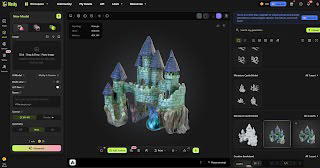
Meshy is one of the leading AI 3D model generators, and its approach shows how flexible the category has become. It offers two main modes. Text to 3D builds a model from a written description, while Image to 3D works from a reference photo or concept art.
Image mode also accepts multiple images of the same object. Feeding it several angles gives the system more information about depth and form, which improves accuracy compared with a single view. For anyone recreating a real-world item, that difference matters.
Built for the Browser, Open to Experimentation
One of the biggest barriers in 3D work has always been setup. Heavy software, powerful hardware, and long installs discourage beginners and slow down busy professionals.
Meshy runs entirely in the browser, so there is nothing to install. A free tier lets you test ideas before committing, which suits makers who want to see whether AI modeling fits their workflow.
The platform also includes a free 3D Tool Kit with three utilities. The Converter changes file formats, the Online Viewer lets you inspect a model, and STL Repair fixes common mesh problems before printing. Export options cover STL, OBJ, GLB, and FBX, so the same asset can go to a printer, a game engine, or a design review without conversion headaches.
From Prompt to Print: A Simple Five-Step Workflow
A reliable process matters more than any single tool. Here is a practical sequence that works for most projects.
- Define the object. Write down size, purpose, and style before you generate anything. Specific prompts produce more usable results.
- Generate with text or images. Use text for original concepts and images when you are matching something that already exists.
- Inspect the result. Rotate the model in a viewer and look for thin walls, gaps, or floating parts.
- Repair and export. Run a repair pass, then export as STL for printing.
- Slice and test. Print a small draft first, adjust the prompt if needed, and then commit to the final run.
Treat the first output as a draft. Iteration is cheap, so refining a prompt two or three times usually beats trying to perfect one attempt.
Beyond Printing: Where Teams and Developers Benefit
Printing is only one use for generated models. Game developers use AI to populate scenes with props and characters quickly. Meshy supports AI texturing and auto-rigging, so a static model can gain surface detail and a skeleton for animation without separate tools.
Product designers use generated models as fast concept visuals before investing in engineering drawings. Educators use them to turn classroom ideas into objects students can hold.
For technical teams, Meshy provides API access, which means generation can be built directly into an existing pipeline or app. A studio could, for example, let customers describe a custom item and receive a printable preview automatically. That kind of integration turns AI modeling from a standalone tool into part of a product.
Frequently Asked Questions
Do I need modeling experience to use AI 3D generation?
No. Text and image inputs are designed for people without CAD training, though a basic understanding of printing constraints helps.
Is a generated model ready to print immediately?
Often it is close, but a quick inspection and repair pass is wise. Small mesh errors can cause failed prints.
Can I use the same model for games and printing?
Yes, provided the platform exports multiple formats. Choose STL for printers and GLB or FBX for game engines.
Conclusion: A Faster, More Accessible Future for Making
The pattern across all of this is clear. The hardest part of 3D printing has shifted from machines to models, and AI is the first technology to ease that pressure in a meaningful way. Text prompts, multi-image input, browser-based tools, and broad export support lower the cost of trying an idea.
For makers and businesses, the long-term value goes beyond speed. When creating a model no longer demands years of training, more people can prototype, test, and refine their ideas. Teams spend less time wrestling with geometry and more time improving designs.
As AI generation matures, expect tighter links between modeling, texturing, animation, and manufacturing. Platforms like Meshy point toward a future where describing an object is the first step of building it, and the gap between imagination and a physical result keeps shrinking.
The post From Idea to Printed Object: How AI Is Rewriting the 3D Modeling Workflow appeared first on Vanguard News.